Amiley: A Handmade Script Font for Creative Web Design
As a web designer, I'm always on the hunt for fonts that can bring a unique and personal touch to my projects. Recently, I had the opportunity to test Amiley, a handmade script font, in a real website layout. The results were nothing short of impressive, and I'm excited to share my experience with you.
The Visual Charm of Amiley
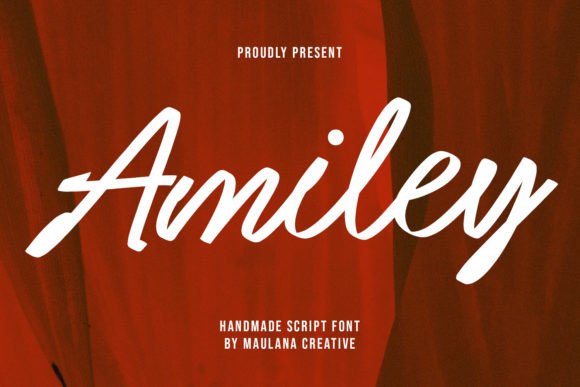
Amiley is a premium script font that exudes a warm, handcrafted feel. Its flowing, elegant strokes give it a charming and approachable personality, making it perfect for adding a touch of creativity and personality to any digital design. The font's natural, slightly irregular lines make it feel organic and human, which is exactly what many of my clients are looking for in their brand identities.
Testing Amiley in a Hero Section
One of the first places I tested Amiley was in the hero section of a boutique online store. The goal was to create a welcoming and inviting atmosphere that would immediately capture the visitor's attention. I used Amiley for the main heading, "Welcome to Our Boutique," and paired it with a clean sans serif font for the subheading and body text. The result was a beautiful balance of elegance and readability. The font's graceful curves and subtle variations made the heading stand out, while the sans serif provided a clear and easy-to-read complement.
Responsive Design and Readability
When designing for the web, responsiveness and readability are crucial. I was pleased to find that Amiley performed well across different screen sizes. On mobile devices, the font maintained its charm without sacrificing legibility. For smaller screens, I adjusted the font size and line height to ensure that the text remained clear and easy to read. This attention to detail is essential for creating a seamless user experience, especially in e-commerce where first impressions can make or break a sale.
Using Amiley in Call-to-Action Areas
Another area where Amiley shone was in call-to-action (CTA) buttons. I used the font for a CTA button on a product landing page, with the text "Shop Now." The decorative nature of the font added a touch of elegance and urgency, making the button more visually appealing and encouraging users to click. However, I also made sure to keep the button size and color contrast high to ensure that the text remained readable and the button stood out against the background.
Font Pairing and Brand Consistency
For a cohesive and professional look, I paired Amiley with a simple sans serif font, such as Lato or Roboto. This combination allowed the script font to take center stage in headings and decorative elements, while the sans serif provided a clean and modern feel for the body text and other supporting elements. This pairing not only enhanced the overall visual hierarchy but also contributed to a consistent and trustworthy brand identity.
Limitations and Best Practices
While Amiley is a versatile and beautiful font, it's important to use it judiciously. I found that it works best for short, impactful text such as headings, CTAs, and logo designs. Using it for long paragraphs or dense information can make the text difficult to read, especially on smaller screens. Additionally, it's important to check the font's webfont availability, file formats, and licensing before using it in client projects or commercial websites.
Conclusion
In conclusion, Amiley is a fantastic choice for web designers looking to add a touch of elegance and personality to their projects. Its handmade, script style makes it ideal for creative and boutique brands, and its performance in responsive layouts and call-to-action areas is excellent. Just remember to use it thoughtfully and pair it with a clean, readable font for the best results. Give Amiley a try in your next project and see how it can elevate your web design to the next level.